1. To give the customer access to all reporting, a customer account must be created. Go to 'Equip company' in the left menu and then to 'Customers'. Select the customer you want to create a account login for. Then click on the tab "Customer’s Login Credentials".
(If customer account has only one location, software takes you directly to that location's Work Orders tab. Please click on the account name that comes after "Home > Equip Company > Customers> " on top bar to get to the customer's account page)
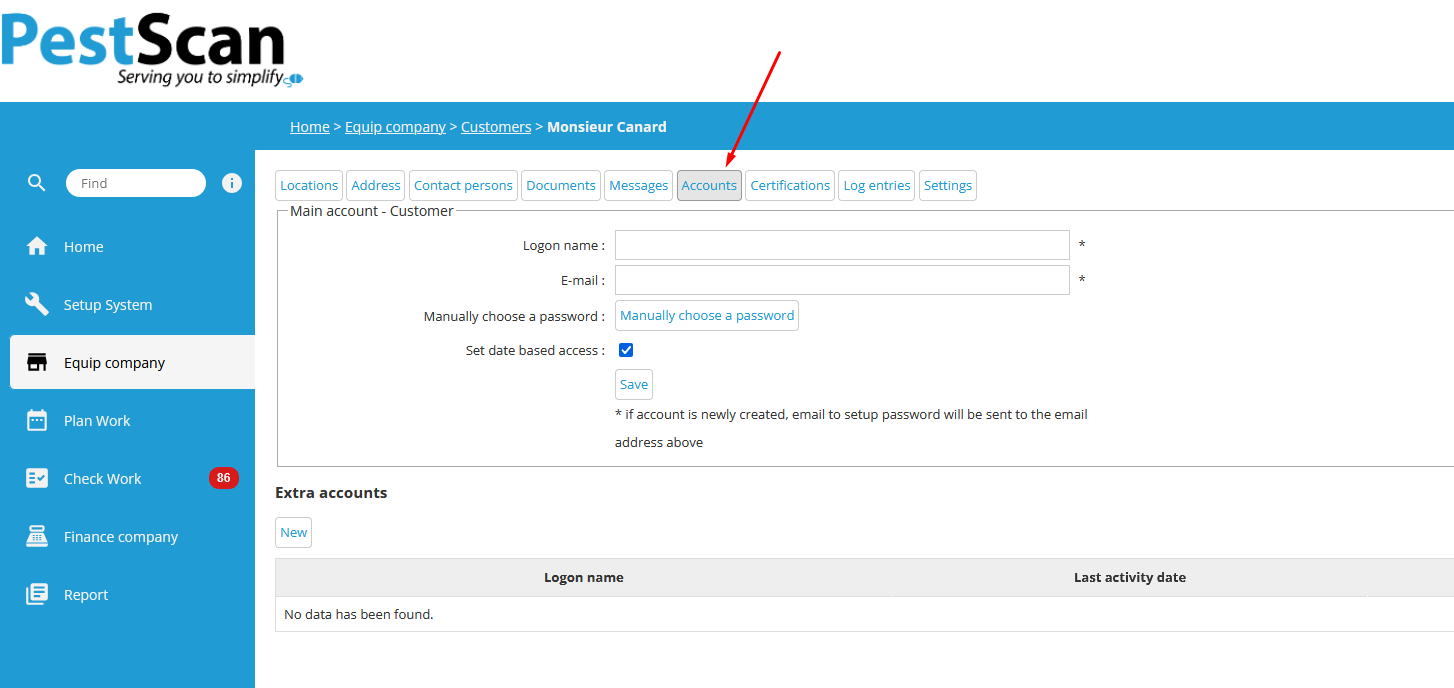
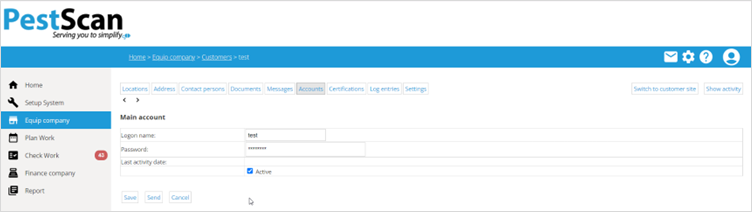
2. Enter a login name and a password here or let the system generate a new password when you click on 'Send'.
3. Do not forget to check the box "Active". Choose 'Save' and your client can now log into PestScan with these details.
Customer portal and Office portal login links are the same, you can share the same link you use for logging into PestScan with your customers.
In order to have an Extra account below, customer must have a Main account first, only then the extra accounts can be used.
For instructions on how to use Customer portal, please check our other articles.
Was this article helpful?
That’s Great!
Thank you for your feedback
Sorry! We couldn't be helpful
Thank you for your feedback
Feedback sent
We appreciate your effort and will try to fix the article